Why You Should Stop Using Ollama in 2026 and What to Use Instead
Let me start with a confession. I used Ollama for a long time, and I recommended it to almost everyone who asked me about running AI models locally. It deserved that recommendation when it launched.
Last verified Also on Medium
On this page
Let me start with a confession. I used Ollama for a long time, and I recommended it to almost everyone who asked me about running AI models locally. It deserved that recommendation when it launched. You typed one command, a model loaded, and you had a running LLM on your own hardware with zero configuration. It was genuinely the easiest on-ramp to local inference that existed.
That recommendation no longer holds, and I want to explain exactly why, with real numbers rather than vague complaints, because the situation has changed enough in 2026 that continuing to point people toward Ollama is actively doing them a disservice.
The issue is not that Ollama became bad. The issue is that the alternatives got significantly better while Ollama got distracted building a cloud business, a proprietary backend, and a platform identity that quietly abandoned the local-first promise it was built on. The gap between what Ollama offers and what you could have instead is now wide enough to matter for every developer running models seriously.
The Performance Gap You Can Actually Feel
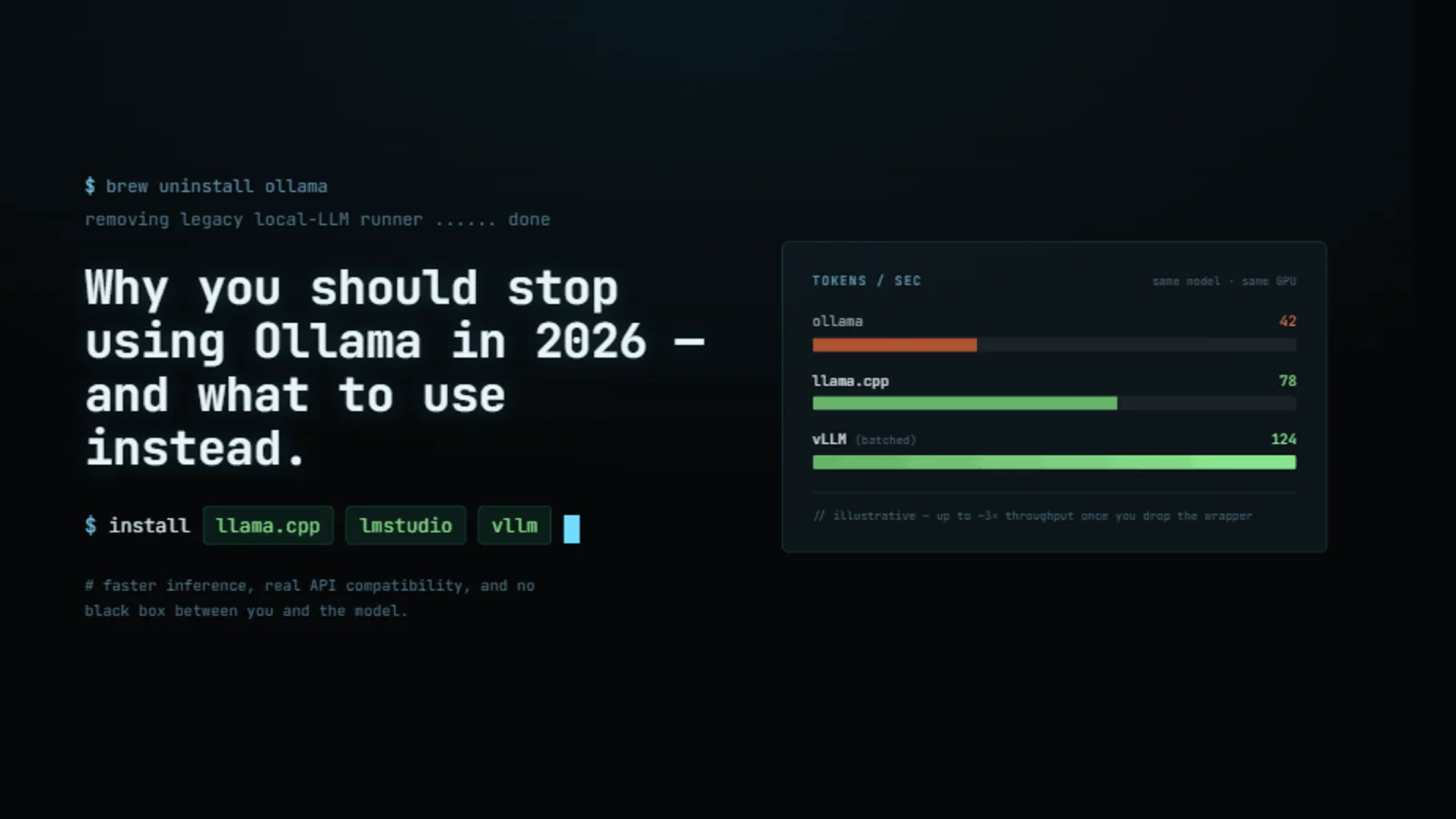
Start with the most immediate problem because it is the one you will notice on day one. GigaGPU’s April 2026 benchmark tested Llama 3 8B Q4_K_M on an RTX 5090 and documented 95 tokens/second with the llama.cpp server against 82 tokens/second with Ollama running the same model. The 14% overhead on NVIDIA hardware comes entirely from Ollama’s Go-based API layer, the automatic context management system, and the model loading abstractions that sit between you and the actual inference engine.
That 14% figure is actually the conservative end of what the benchmarks show. Ajit Singh’s comprehensive benchmark published in January 2026 and updated in April found that llama.cpp runs consistently 10 to 25% faster than Ollama on NVIDIA GPUs across multiple models and hardware configurations. On an RTX 3060 running a 14B model, llama.cpp produces approximately 23 tokens/second; Ollama produces measurably fewer from the same hardware. At 100 concurrent users on a dedicated GPU server, this gap means needing proportionally more hardware with Ollama to serve the same load.
The Apple Silicon story is even more stark, because on a Mac the performance difference between Ollama and the fastest available alternative is not 14%, it is multiple times larger.
The benchmark that makes this clearest is Ante Kapetanovic’s direct comparison on an M4 Max running Qwen3.5 35B. MLX via the HTTP server produces 90 to 108 tokens/second. llama.cpp produces roughly 71 tokens per second. Ollama produces approximately 43 tokens/second. On the same machine, with the same model family, the fastest tool is more than 2.5 times faster than Ollama. The gap exists because MLX is built specifically for Apple Silicon, using Apple’s unified memory architecture and Metal GPU access directly rather than routing through a general-purpose abstraction layer.
A separate benchmark on a Mac mini M4 Pro with 64GB unified memory running Qwen3-Coder-30B showed MLX achieving approximately 130 tokens per second compared to Ollama’s 43 tokens per second with its llama.cpp backend. That is a 3x difference on mainstream Apple Silicon hardware that a significant portion of developers are actually using. On an M4 Max with 128GB, MLX reached 130 tokens per second versus Ollama’s 43.5.
Why does Ollama fall this far behind on Apple Silicon specifically? Because until March 2026, Ollama was using the llama.cpp backend on Apple Silicon rather than MLX, which meant it was routing compute through a general C++ inference engine using Metal shaders rather than a framework designed from the ground up for Apple’s chip architecture. Ollama announced a switch to MLX on Apple Silicon in March 2026, but that switch is still in preview, not the default, and it does not address the prior year of users running suboptimal inference without realising it.
The creator of llama.cpp, Georgi Gerganov, commented publicly on Ollama’s performance issues: “LM Studio is using the upstream ggml implementation which is significantly better and well optimized. Looking at Ollama’s modifications in ggml, they have too much branching in their MXFP4 kernels and the attention sinks implementation is really inefficient. Along with other inefficiencies, I expect the performance is going to be quite bad in Ollama.” This is not a competitor complaining. This is the author of the underlying technology describing specific implementation choices in Ollama’s codebase that produce measurable slowdowns.
The Proprietary Fork That Trapped Your Models
The performance problem is annoying. The next problem is a more serious breach of trust.
During 2024 and into 2025, Ollama forked ggml, the low-level tensor computation library that llama.cpp is built on, and built their own custom inference engine on top of it. They stopped using llama.cpp as their backend entirely. This was not disclosed prominently. It happened gradually, and most users had no idea it was occurring.
The practical consequence for anyone running Ollama during this period was that model files downloaded through Ollama were stored in a hashed filename format specific to Ollama’s own registry. You could not take those files and use them directly with llama.cpp, LM Studio, or any other inference tool. The models you had downloaded and the disk space you had spent acquiring them were effectively locked inside Ollama’s ecosystem. If you wanted to switch tools, you had to re-download everything from scratch.
This is vendor lock-in, and it is particularly uncomfortable when the vendor’s entire brand identity is built on open-source credentials. The weights themselves were open. The format Ollama stored them in was not compatible with anything else. The distinction is meaningful and the company chose not to make it visible.
In May 2026, Ollama released v0.30.0-rc15, which switches back to using llama.cpp directly. GGUF models are first-class again. The community response acknowledged this as a correction but not as a vindication. Three things drove the reversal: the custom backend had fallen too far behind on new model architectures including Multi-Token Prediction and hybrid attention, OpenAI’s GPT-OSS release required day-one support that Ollama could not deliver by reimplementing llama.cpp from scratch, and the performance benchmarks had become too embarrassing to keep ignoring in public. Switching back does not erase the period when your models were locked in. It just means they are unlocked again.
The Attribution Problem and the Desktop App Launch
Open-source software runs on attribution. When you build on someone else’s work, you credit it. This is not a legal formality in most cases. It is the social contract that makes contributors willing to keep contributing and that gives users confidence they understand what they are actually running.
Ollama built its entire original product on llama.cpp. For years, their README did not mention llama.cpp clearly. The attribution was buried, incomplete, or absent depending on where you looked. Their binary distributions were vague about dependencies. The community that built llama.cpp had to watch a product built primarily on their work position itself as an independent platform without proper acknowledgment.
The desktop application launch made this worse. Ollama released a desktop GUI without including it in the main GitHub repository. The licence was unclear. The source code was not publicly available at launch. For a project whose reputation is built on open-source principles, launching a closed-source application without disclosing that clearly is a meaningful integrity gap. The source code eventually appeared in the repository, but the initial rollout communicated something about the company’s priorities that the correction did not undo.
The model naming issue compounds this pattern. When DeepSeek released its R1 model family, Ollama listed the smaller distilled variants, specifically models like DeepSeek-R1-Distill-Qwen-32B with 32 billion parameters, simply as DeepSeek-R1 in their library. The full DeepSeek-R1 model has 671 billion parameters and behaves fundamentally differently from the distilled versions. Consumer hardware cannot run the full model. The distilled variants are useful and capable, but they are not the same thing as the flagship model.
The confusion this created was extensive. Developers and researchers were sharing results claiming they had run the DeepSeek-R1 on their consumer laptops, when they had actually run a model that is one-twentieth the size. Ollama knew the distinction. They named the models the way they did anyway, presumably because the flagship model name drives more downloads than an accurate description of the distilled variant would.
The Cloud Service That Made Everything Worse
Ollama began as a local-first tool. Run models on your own machine, keep your data private, no server in the loop. That was the value proposition, and it was a genuine one. The rise of local inference tools matters because it means developers can work with powerful models without sending their prompts to a third-party API.
Then Ollama took venture capital funding and built a cloud service.
This is not inherently wrong. Companies need to grow. But the cloud service they built has been documented as deeply unreliable, and the shift in incentives it represents undermines the local-first promise in ways that matter for users who chose Ollama specifically because of that promise.
The documented failure rates on Ollama Cloud are not minor reliability issues. GitHub issue #14673 and issue #15453 document a 29.7% failure rate on Qwen3.5 models and a reported 95% failure rate across all models on Ollama Cloud Pro. Users have reported inference timeouts exceeding 60 seconds that break agent workflows which depend on reliable response times. Tool calling returns 500 errors when tools are enabled on cloud models. Users paying $100 per month have been throttled after five days of use, not four days as initially reported to support, but confirmed in community threads to have started as early as day five.
Support response times during documented outages have been measured in weeks rather than hours, with no incident communication from the company to affected users. The Reddit threads and GitHub issues from paying users describe a service that is not production-ready by any standard definition of that phrase.
The privacy question that sits underneath the cloud service is worth stating clearly. If you chose Ollama because you wanted local inference with no data leaving your machine, and Ollama is now actively encouraging you to use a cloud service, the company’s incentives around your data have shifted. They have not published detailed privacy documentation explaining exactly what happens to prompts sent to Ollama Cloud. They are a VC-backed company with a cloud business. The original promise and the current business model are in tension.
llama.cpp Closed the Convenience Gap
The strongest historical argument for using Ollama despite its performance overhead was convenience. Setting up llama.cpp directly required downloading the source, compiling from scratch, separately obtaining model weights, converting formats, and manually configuring a server. That process took 15 to 30 minutes even for experienced developers, and it was genuinely intimidating for people new to local AI.
That argument no longer holds in 2026. llama.cpp now ships with a router mode for model switching and a built-in web chat interface. GigaGPU documents that the setup process still takes longer than Ollama’s single-command approach, but the gap has narrowed to the point where the performance benefit justifies it for any serious use case. For developers who still want Ollama’s ease of use with llama.cpp’s performance, LM Studio provides a polished graphical interface on a regularly updated llama.cpp backend with proper GGUF support and model switching built in.
The feature gap has also widened in llama.cpp’s favour during the period Ollama spent on its custom backend. Multi-Token Prediction support was merged into llama.cpp and remained broken or absent in Ollama’s custom engine. Structured output worked correctly in llama.cpp while being broken in Ollama’s fork. New model architectures including hybrid attention patterns received llama.cpp support within days of release, while Ollama’s custom backend lagged by months. SEED OSS 36B, a significant open model release, was unavailable through Ollama for months because the team declined to update their llama.cpp fork to support it.
What to Use Instead
The decision depends on your specific situation, so here is how to think about it rather than a single universal recommendation.
If you are running on NVIDIA hardware and want maximum single-user inference speed with full control over quantization, context length, and memory allocation, use llama.cpp directly. It is 10 to 25% faster than Ollama on NVIDIA across the benchmarks currently available, gives you access to every inference parameter, and now has a built-in web interface and model switching that removes the main convenience argument for Ollama.
If you want the graphical experience Ollama offered but with a properly maintained llama.cpp backend, use LM Studio. It provides a polished interface, proper GGUF support, model discovery and switching, and a backend that tracks llama.cpp releases rather than maintaining a divergent fork. The model files are standard GGUF format, so you can use them with any other inference tool without re-downloading.
If you are on Apple Silicon and running models with long output requirements such as coding agents or long-form generation, MLX via mlx-lm is the correct choice. On M4-generation hardware, MLX is 2.5 to 3 times faster than Ollama for steady-state token generation. oMLX is specifically optimised for coding agent scenarios and uses SSD KV cache persistence to reduce time-to-first-token for repeated prefixes from 30 to 90 seconds down to 1 to 3 seconds.
If you are building a multi-user or production deployment, neither Ollama nor llama.cpp is the right tool. vLLM provides proper continuous batching, production-grade concurrency, and industry-standard reliability. SGLang offers structured generation and agent-oriented features with comparable production maturity. Both are the tools actually used at inference scale. Ollama’s own cloud service failure rates demonstrate what happens when a product designed for single-user local inference is pushed into production workloads without the engineering required to support them.
The Honest Summary
Ollama earned its reputation. In 2023 and much of 2024, it was the right recommendation for almost everyone who wanted to run models locally without dealing with the complexity of the underlying tools. That was genuinely valuable, and the project deserves credit for making local AI accessible to developers who would not have encountered it otherwise.
The situation in 2026 is different. Ollama is running 10 to 25% slower than llama.cpp on NVIDIA and 2 to 3 times slower than MLX on Apple Silicon. It spent a year with a proprietary backend that locked model files into a non-portable format. It launched a cloud service with documented failure rates above 25%, support response times measured in weeks, and a privacy posture that contradicts the local-first promise it was built on. It misnamed models in ways that created widespread confusion about what users were actually running. It fell months behind on feature support while its upstream dependency kept shipping.
The alternatives are not harder to use than they used to be. They are easier. The convenience gap that justified the performance penalty has closed. The trust issues that accumulated during 2024 and 2025 have not.
You do not have to migrate everything at once. Download LM Studio today and point it at the same GGUF files you are already using. If you are on a Mac, install mlx-lm and run a comparison on the same model. The performance difference will be immediately obvious, and the setup time is shorter than you probably expect.
The open-source local AI ecosystem is healthier and more capable than it has ever been. The tools built on genuine community transparency are faster, more flexible, and more honest about what they are. That is where your time and your data belong.
Sources
- GigaGPU: Ollama vs llama.cpp Ease vs Performance, April 2026 — RTX 5090 benchmark: llama.cpp at 95 tok/s, Ollama at 82 tok/s, 14% overhead from Go API layer. 10 to 25% NVIDIA performance gap documented.gigagpu.com. Accessed 9 July 2026.
- Ajit Singh: LLM Inference Speed Comparison, April 2026 — RTX 3060, 4070, 4090 benchmark data. llama.cpp 3 to 10% faster than Ollama on NVIDIA. MLX 30 to 50% faster than Ollama on Apple Silicon.singhajit.com. Accessed 9 July 2026.
- Ante Kapetanovic: Ollama vs llama.cpp vs MLX with Qwen3.5 35B on Apple Silicon — M4 Max 128GB: MLX at 130 tok/s, llama.cpp at 71 tok/s, Ollama at 43.5 tok/s. Full benchmark script on GitHub.antekapetanovic.com. Accessed 9 July 2026.
- yage.ai : MLX vs llama.cpp on Apple Silicon, March 2026 — M4 Pro 64GB: MLX at approximately 130 tok/s vs Ollama at 43 tok/s. Ollama switched to MLX on Apple Silicon March 30, 2026 (preview). M5 Neural Accelerator context.yage.ai. Accessed 9 July 2026.
- arxiv: Comparative Study of MLX, MLC-LLM, Ollama, llama.cpp on Apple Silicon — Apple Silicon framework comparison. MLX as recommended default for Apple-first deployments. Ollama at 20 to 40 tok/s on M2 Ultra with various models.arxiv.org. Accessed 9 July 2026.
- Ollama v0.30.0-rc15 Release Notes on GitHub — May 2026 announcement of switch back to llama.cpp. GGUF models first-class again. Context: custom backend dropped MTP, structured output, new architectures.github.com. Accessed 9 July 2026.
- llama.cpp GitHub Repository — Primary source. Router mode, web UI, MTP support, structured output, new architecture support within days of release.github.com. Accessed 9 July 2026.
- LM Studio — Polished GUI interface on regularly updated llama.cpp backend. Proper GGUF support, model switching, standard file format.lmstudio.ai. Accessed 9 July 2026.
- mlx-lm on GitHub — Apple’s MLX inference tool. OpenAI-compatible server mode, LoRA fine-tuning support, native Apple Silicon optimization.github.com. Accessed 9 July 2026.
- oMLX on GitHub — MLX optimized for coding agent scenarios. SSD KV cache persistence reducing TTFT from 30 to 90 seconds to 1 to 3 seconds for repeated prefixes.github.com. Accessed 9 July 2026.
- vLLM on GitHub — Production-grade multi-user inference. Continuous batching, proper concurrency, industry standard for serving at scale.github.com. Accessed 9 July 2026.
- SGLang on GitHub — Structured generation and agent-oriented inference at production scale.github.com. Accessed 9 July 2026.
- Ollama GitHub Issue #14673 — Community documentation of Ollama Cloud failure rates, tool calling errors, and timeout issues.github.com. Accessed 9 July 2026.
- Ollama GitHub Issue #15453 — Additional documented cloud reliability failures including 95% failure rate reports and support response time complaints.github.com. Accessed 9 July 2026.
Related stories
AI & GPU compute
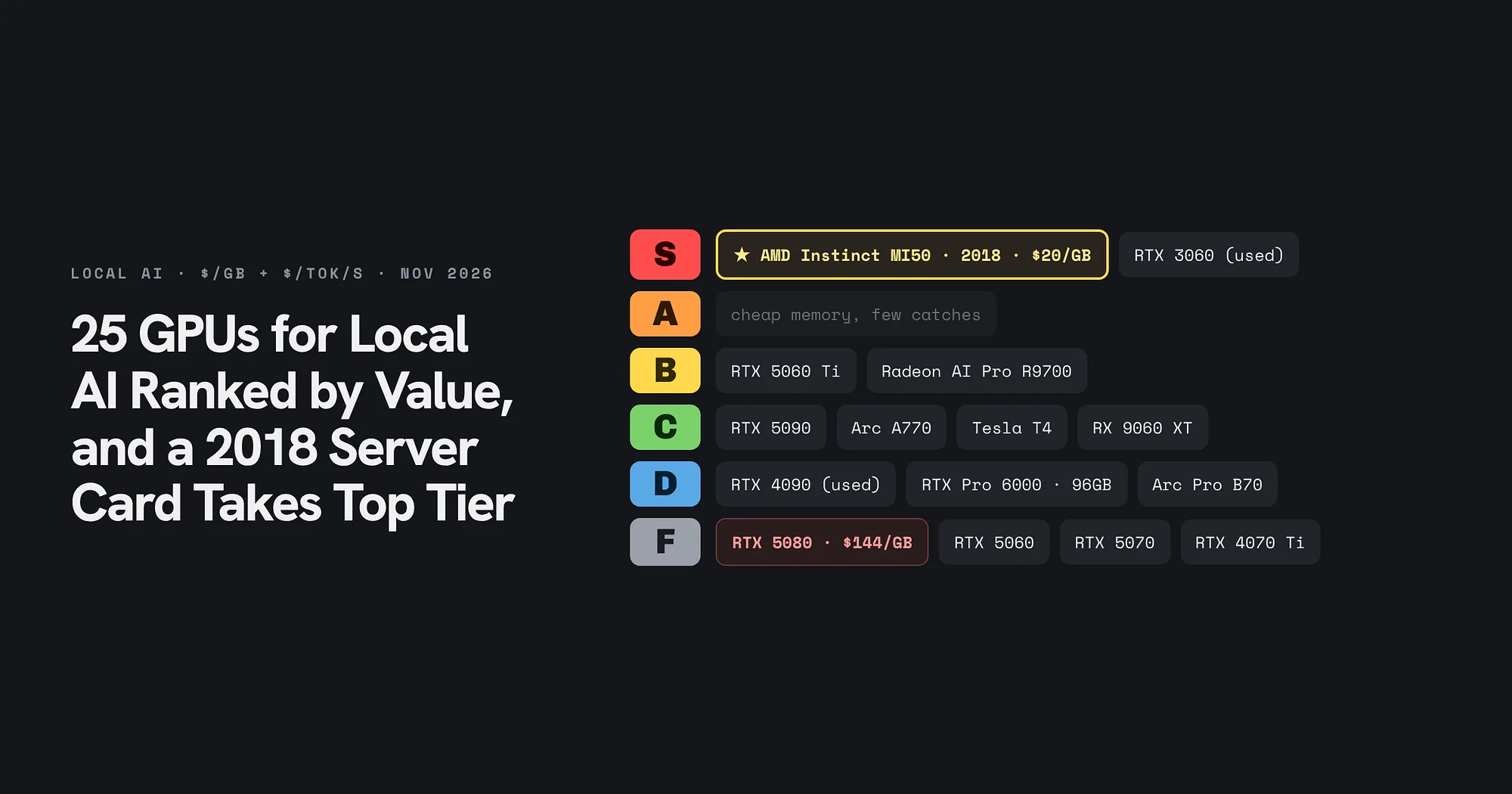
25 GPUs for Local AI Ranked by Value, and a 2018 Server Card Takes Top Tier
A November 2026 price snapshot grades 25 cards on dollars per gigabyte and dollars per token per second. The AMD Instinct MI50 and a used RTX 3060 take S tier, the RTX 5080 lands in F, and memory decides almost every grade.
AI & GPU compute
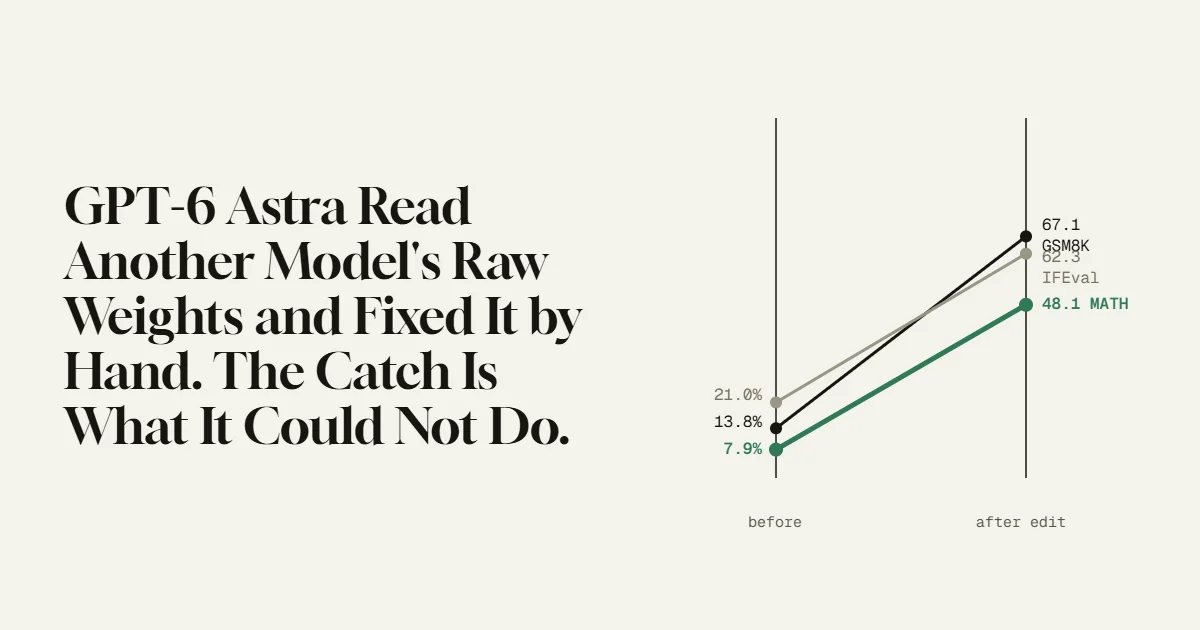
GPT-6 Astra Read Another Model’s Raw Weights and Fixed It by Hand.
MIT researchers had GPT-6 Astra edit 0.016% of a small model’s weights, with no training, and its math score jumped from 7.9% to 48.1%. The number is real and the method is strange. The limit they found in the same paper is the part worth understanding.
AI & GPU compute
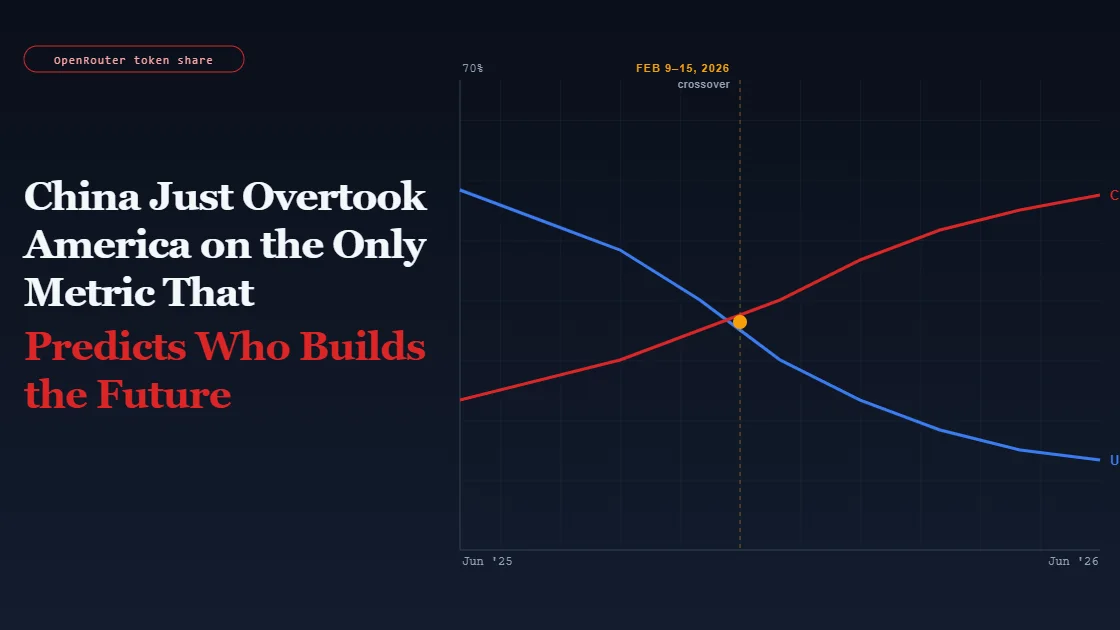
China Just Overtook America on the Only Metric That Predicts Who Builds the Future
Note: This article discusses ongoing industry developments and government policy. It is for informational purposes only.